You don't need to spend a single dollar to use powerful AI tools in 2026. The best AI companies now offer generous free tiers that give you real, usable access to cutting-edge technology.
Whether you need help writing, coding, creating images, editing video, or doing research, there's a free AI tool that can handle it. This guide covers the best free options in every category, what you actually get for free, and when it makes sense to upgrade.
Let's get into it.
Why Free AI Tools Are Better Than Ever
A few years ago, free AI tools were limited demos. You got a taste, hit a wall, and had to pay. That's changed dramatically in 2026.
Here's why:
- Competition drives generosity: ChatGPT, Claude, Gemini, and others are fighting for users. Free tiers keep getting better because each company wants you locked into their ecosystem
- Costs dropped: Running AI models is significantly cheaper now. What cost $20/month in 2024 can be offered free in 2026
- Ad and data models: Some tools offer free access in exchange for using your interactions to improve their models (with opt-out options)
- Freemium works: Companies know that free users convert to paid over time, so they invest in making the free experience genuinely good
The result? You can build a complete AI-powered workflow without spending anything.
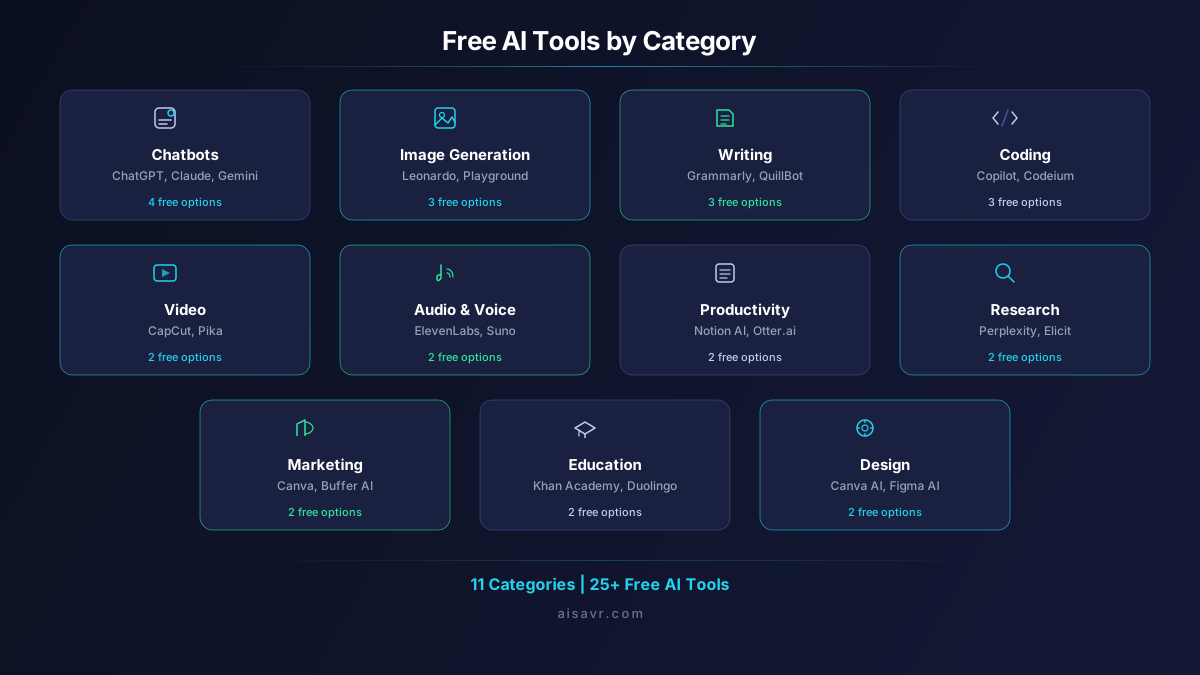
Best Free AI Chatbots
1. ChatGPT (OpenAI)
ChatGPT's free tier in 2026 gives you access to GPT-5.4, the same model paid users get. The catch is usage limits: roughly 15 messages every 3 hours.
What you get for free:
- Access to GPT-5.4 (the latest model)
- Basic web search
- File uploads and analysis
- Code interpreter (limited)
- Mobile and desktop apps
What you don't get:
- High usage limits (15 vs 80 messages per 3 hours)
- Image generation with DALL-E
- Full agentic capabilities
- Priority speed during peak times
Best for: General-purpose AI assistance, quick questions, brainstorming, and light daily use.
2. Claude (Anthropic)
Claude's free tier gives you access to Claude 4 Sonnet, which is excellent for writing, analysis, and careful reasoning. Usage is limited but the quality per response is outstanding.
What you get for free:
- Claude 4 Sonnet (very capable model)
- Long context understanding
- File and document analysis
- Clean, well-structured responses
Best for: Writing projects, document analysis, careful reasoning tasks, and anything where response quality matters more than volume.
3. Gemini (Google)
Gemini might have the most generous free tier of any AI chatbot. You get Gemini 2.5 Flash with fairly high usage limits, plus deep Google integration.
What you get for free:
- Gemini 2.5 Flash (fast and capable)
- Google Search integration
- Google Workspace integration (Docs, Sheets, Gmail)
- Image understanding
- Extensions for Maps, YouTube, Flights, Hotels
Best for: Anyone deep in the Google ecosystem. The free tier is genuinely generous and the Google integrations are useful for everyday tasks.
4. DeepSeek
DeepSeek is the surprise entry here. It's completely free with very high limits, and the reasoning capabilities are impressive for a free tool.
What you get for free:
- DeepSeek-V3 (strong reasoning model)
- Very generous usage limits
- Web search capability
- Code generation
Best for: Users who need high-volume AI access without any cost. Great for coding and technical questions.
Best Free AI Image Generators
1. Leonardo AI
Leonardo gives you 150 daily tokens for free, which is enough to generate several high-quality images per day. The quality rivals Midjourney for many use cases.
What you get for free:
- 150 tokens per day (refreshes daily)
- Multiple AI models to choose from
- Image-to-image generation
- AI Canvas for editing
- Community-trained models
Best for: Regular image generation needs. The daily refresh means you always have fresh credits.
2. Microsoft Designer (DALL-E)
Microsoft's Designer tool uses DALL-E and gives you free image generations daily. It's simple, fast, and integrated with Microsoft accounts.
What you get for free:
- 15 image generations per day
- DALL-E 3 quality
- Built-in design templates
- Social media format presets
Best for: Quick image creation for social media, presentations, and simple design needs.
3. Playground AI
Playground offers generous daily free generations with multiple model options and a clean interface.
What you get for free:
- 50 images per day
- Multiple generation models
- Image editing tools
- Community gallery for inspiration
Best for: High-volume image generation needs where quantity matters alongside quality.
Best Free AI Writing Tools
1. Grammarly Free
Grammarly's free tier handles basic grammar, spelling, punctuation, and tone detection. It works as a browser extension, desktop app, and mobile keyboard.
What you get for free:
- Grammar and spelling corrections
- Tone detection
- Basic clarity suggestions
- Browser extension for all websites
- Works in Google Docs, email, social media
Best for: Everyone who writes in English online. The browser extension alone catches embarrassing mistakes before you hit send.
2. QuillBot Free
QuillBot is excellent for paraphrasing and rewriting. The free tier gives you limited paraphrases per day, but they're high quality.
What you get for free:
- Paraphraser (125-word limit)
- Grammar checker
- 2 writing modes (Standard and Fluency)
- Chrome extension
Best for: Students and writers who need to rephrase content while maintaining meaning.
3. ChatGPT or Claude for Writing
Honestly, the free tiers of ChatGPT and Claude are powerful writing assistants on their own. You can draft emails, blog posts, social media captions, cover letters, and more.
Pro tip: Use Claude for longer writing pieces where quality matters. Use ChatGPT for quick drafts and brainstorming.
Best Free AI Coding Tools
1. GitHub Copilot Free
GitHub Copilot's free plan is a game-changer for developers. You get 2,000 code completions per month and 50 chat messages, which is plenty for most individual developers.
What you get for free:
- 2,000 code completions per month
- 50 chat messages per month
- Works in VS Code, JetBrains, Neovim
- Multi-language support
- Code explanations
Best for: Individual developers who want AI code completion without paying. The 2,000 completions cover most casual to moderate coding sessions.
2. Codeium (Windsurf)
Codeium offers unlimited AI code completions in its free tier, which is remarkable. If GitHub Copilot's 2,000 monthly limit feels restrictive, Codeium is your answer.
What you get for free:
- Unlimited code completions
- AI chat for code questions
- Supports 70+ languages
- Works in all major IDEs
Best for: Developers who need unlimited completions and don't want usage caps.
3. Cursor (Free Tier)
Cursor is an AI-first code editor that offers a free tier with limited AI features. It's built on VS Code, so the transition is seamless.
What you get for free:
- 2,000 completions per month
- 50 slow premium requests
- Built-in terminal AI
- Code search and navigation
Best for: Developers who want to try an AI-native code editor before committing to a subscription.
Best Free AI Video Tools
1. CapCut
CapCut is the best free video editor with AI features. It's made by ByteDance (the TikTok company) and is completely free with powerful AI tools built in.
What you get for free:
- Full video editing suite
- AI-powered background removal
- Auto-captions and subtitles
- AI video effects
- Templates for social media formats
- Desktop, web, and mobile apps
Best for: Social media content creators. CapCut's free tier is genuinely better than many paid video editors.
2. Pika (Free Tier)
Pika generates short AI videos from text prompts. The free tier gives you limited daily generations.
What you get for free:
- 5 video generations per day
- Text-to-video generation
- Image-to-video animation
- Basic editing tools
Best for: Experimenting with AI video generation and creating short clips.
Best Free AI Research Tools
1. Perplexity AI
Perplexity is the best free AI research tool available. It searches the web and gives you sourced, cited answers. The free tier is surprisingly useful.
What you get for free:
- Unlimited basic searches
- 5 Pro searches per day (uses advanced models)
- Source citations on every answer
- Follow-up questions
- Collections to organize research
Best for: Anyone who needs reliable, sourced information quickly. It's a better starting point than Google for many research questions.
2. Elicit
Elicit focuses on academic research. It searches through millions of scientific papers and helps you find relevant studies.
What you get for free:
- Search across 200M+ academic papers
- AI-generated summaries of papers
- Citation extraction
- Basic data tables
Best for: Students, researchers, and anyone who needs to find and understand academic literature.
Best Free AI Productivity Tools
1. Notion AI (Free Tier)
Notion's free plan includes limited AI features that help with note-taking, project management, and documentation.
What you get for free:
- AI writing assistance (limited queries)
- Smart templates
- Free workspace for personal use
- Basic project management
Best for: Personal productivity and note-taking with occasional AI assistance.
2. Otter.ai
Otter transcribes meetings and conversations for free. The free tier is limited but useful for occasional use.
What you get for free:
- 300 minutes of transcription per month
- Real-time transcription
- Speaker identification
- Searchable transcripts
Best for: Students recording lectures and professionals who attend occasional meetings.
Best Free AI Audio and Music Tools
1. Suno AI
Suno generates full songs from text prompts. The free tier lets you create 5 songs per day, which is enough to experiment and find what works.
What you get for free:
- 5 song generations per day
- Full lyrics and melody generation
- Multiple genre options
- Download and share
Best for: Content creators who need background music, hobbyists experimenting with AI music, and anyone who wants to create songs without musical training.
2. ElevenLabs (Free Tier)
ElevenLabs offers text-to-speech with remarkably human-sounding voices. The free tier gives you 10,000 characters per month.
What you get for free:
- 10,000 characters per month
- Multiple voice options
- High-quality speech synthesis
- Voice cloning (1 custom voice)
Best for: Content creators who need voiceovers, developers building voice features, and anyone who needs text read aloud naturally.
Free vs Paid: When Should You Upgrade?
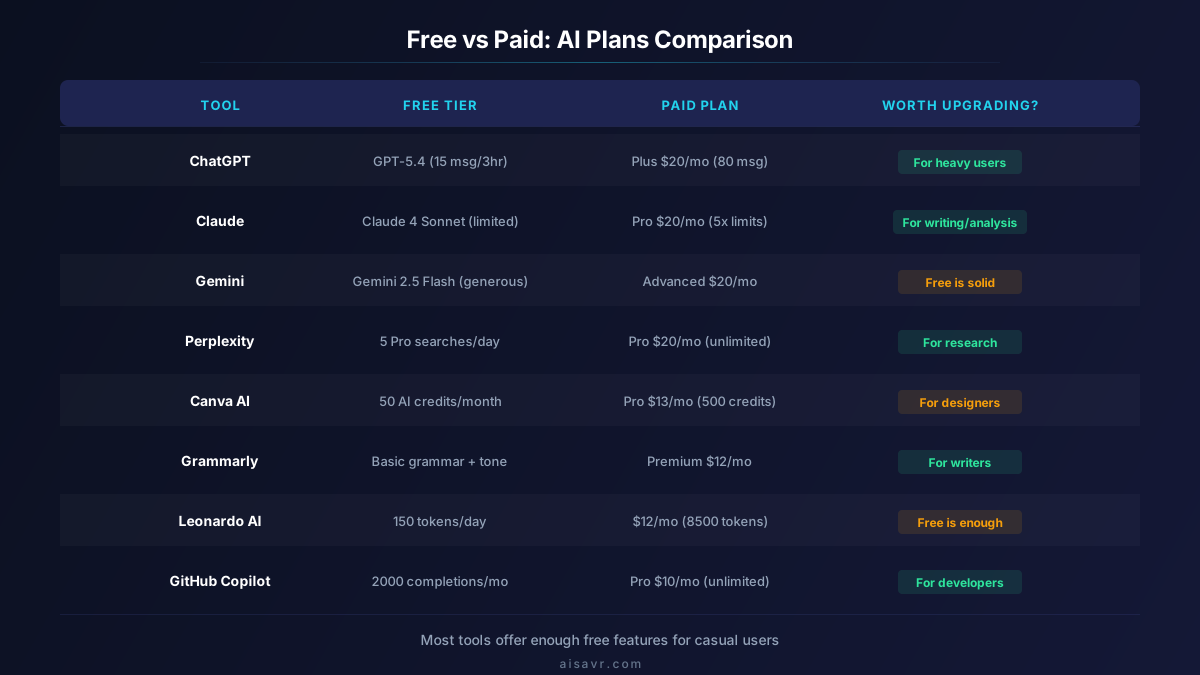
The honest answer: most people don't need to.
Here's when free is enough:
- Casual users who use AI a few times a day: free tiers are plenty
- Students doing homework and research: free ChatGPT, Claude, or Perplexity covers it
- Hobbyists making art or music: free Leonardo and Suno are generous
- Light coders who code occasionally: GitHub Copilot Free or Codeium handles it
Here's when you should consider paying:
- Heavy daily users who hit free limits regularly
- Professionals whose work depends on AI output quality and speed
- Developers who code all day and need unlimited completions
- Businesses that need team features, priority access, or API access
| Category | Best Free Option | Free Limit | Paid Alternative |
|---|---|---|---|
| Chatbot | Gemini | Very generous | ChatGPT Plus ($20/mo) |
| Writing | Grammarly Free | Unlimited basic | Grammarly Premium ($12/mo) |
| Image Gen | Leonardo AI | 150 tokens/day | Midjourney ($10/mo) |
| Coding | Codeium | Unlimited | GitHub Copilot Pro ($10/mo) |
| Research | Perplexity | 5 Pro/day | Perplexity Pro ($20/mo) |
| Video | CapCut | Full editor free | Runway ($12/mo) |
| Audio | Suno | 5 songs/day | Suno Pro ($10/mo) |
| Design | Canva Free | 50 AI credits/mo | Canva Pro ($13/mo) |
How to Build Your Free AI Stack
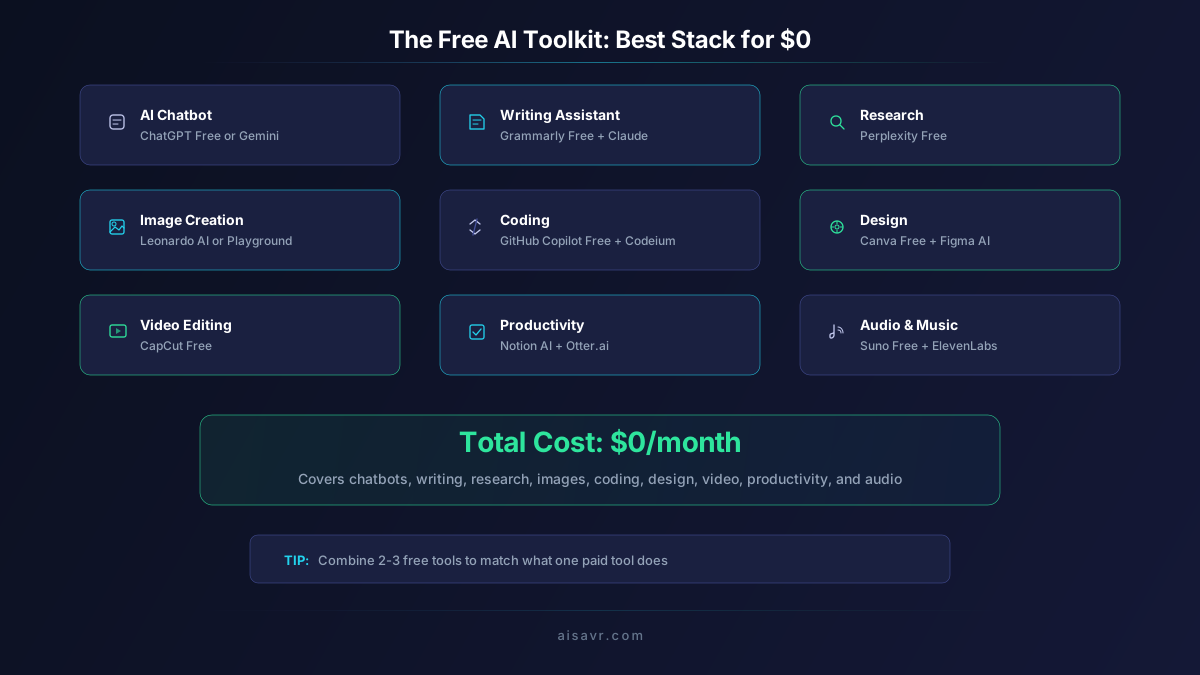
Here's the recommended free toolkit that covers every common use case:
- Daily AI assistant: ChatGPT Free or Gemini (whichever you prefer)
- Deep writing/analysis: Claude Free (better quality for long-form work)
- Research: Perplexity Free (sourced answers beat guessing)
- Grammar: Grammarly Free (install the browser extension, it's always useful)
- Images: Leonardo AI (150 daily tokens is generous)
- Coding: GitHub Copilot Free or Codeium (depends on your IDE preference)
- Video: CapCut (easily the best free video editor)
- Music/Audio: Suno Free (5 songs/day is plenty for most people)
- Presentations: Canva Free (50 AI credits/month for designs)
This stack covers chatbots, writing, research, images, code, video, audio, and design, all at zero cost.
Tips for Getting the Most from Free AI Tools
1. Rotate Between Chatbots
When you hit the free limit on ChatGPT, switch to Claude or Gemini. Each has different limits that refresh at different times. You essentially get 3x the free usage by rotating.
2. Be Specific in Your Prompts
Free tiers mean fewer messages. Make each one count:
- Bad: "Help me write something"
- Good: "Write a 200-word product description for a fitness tracking app targeting busy professionals. Tone: friendly and motivating"
3. Use Browser Extensions
Install Grammarly, Perplexity, and your preferred chatbot's browser extension. This puts AI help one click away on any website.
4. Combine Tools
No single free tool does everything well. Use the right tool for each task:
5. Check for Student/Education Plans
Many tools offer extended free tiers for students with a .edu email. GitHub Copilot is completely free for verified students. Notion offers free team features for education.
What's Coming Next for Free AI
The free AI landscape is only getting more competitive. Here's what to expect in the rest of 2026:
- Higher free limits: As costs drop, expect free tiers to become even more generous
- More tools going free: Smaller AI companies are launching with free-first models to compete with the big players
- Better quality at the free tier: The gap between free and paid is shrinking fast
- Open-source alternatives: Tools like Llama and Stable Diffusion let you run powerful AI locally for free, with no usage limits at all
The Bottom Line
You can do serious work with free AI tools in 2026. The quality gap between free and paid has never been smaller. ChatGPT, Claude, Gemini, Perplexity, Leonardo, Grammarly, GitHub Copilot, CapCut, and Suno offer genuinely useful free tiers that cover nearly every use case.
Start with the free stack recommended above. Use each tool for what it does best. Only upgrade when you consistently hit free limits and the extra capacity would save you meaningful time.
The best AI tool is the one you actually use, and free removes every barrier to getting started.