
AI video generation has gone from "interesting demo" to "production-ready tool" in 2026. You can now create professional-looking video content from nothing but a text prompt.
Here's every AI video tool that matters, what each one does best, and how to choose.
Text-to-Video Generators
1. Sora (OpenAI)
Best for: Cinematic, photorealistic video
Sora produces the most realistic AI-generated video available. Its understanding of physics, lighting, and camera movement creates footage that often passes for real at first glance.
Strengths: Unmatched realism, good physics understanding, up to 1 minute duration. Limitations: Slow generation (several minutes), limited availability, expensive credits. Access: ChatGPT Plus (50 videos/month) or Pro ($200/month for unlimited).
2. [Runway](/tools/runway/) Gen-4
Best for: Professional video production with precise control
Runway is the professional's choice. Gen-4 offers motion brush controls, camera movement specification, and consistent character generation. The editing suite helps you refine AI output into polished content.
Strengths: Motion controls, character consistency, professional editing tools, 16-second clips. Limitations: Shorter clips than Sora, requires more direction. Pricing: From $12/month.
3. [Pika](/tools/pika/) 2
Best for: Creative effects and social media content
Pika focuses on creative, fun video generation with unique effects (inflate, melt, explode, crush). The lip-sync feature creates talking-head videos, and generation is faster than competitors.
Strengths: Fast generation, creative effects, lip-sync, affordable. Limitations: Lower quality than Sora/Runway for realistic footage. Pricing: From $8/month.
4. [Kling AI](/tools/kling-ai/)
Best for: Accessible AI video with generous free tier
Kling offers impressive video generation quality with one of the most generous free tiers. Great for experimentation and casual use.
Strengths: Good quality, generous free tier, improving rapidly. Limitations: Less control than Runway, occasional artifacts. Pricing: Free tier available.
5. [Luma Dream Machine](/tools/luma-dream-machine/)
Best for: Quick, dreamy video generation
Luma produces distinctive, slightly stylized videos quickly. The aesthetic is more artistic than photorealistic, which works well for creative content.
Strengths: Fast, unique aesthetic, good for creative projects. Limitations: Less realistic than Sora, limited control. Pricing: Free tier, Pro from $10/month.
AI Video Editing and Enhancement
6. Runway (Editing Suite)
Beyond generation, Runway's editing tools include green screen removal, motion tracking, and AI-powered editing. A complete video production tool.
7. Descript
Edit video by editing text. Descript transcribes your video, lets you cut, rearrange, and edit by modifying the transcript. AI removes filler words and generates clips.
Pricing: Free tier, Pro from $24/month.
8. Opus Clip
Turns long videos into viral short-form clips. AI identifies the best moments, adds captions, formats for vertical, and scores virality.
Pricing: Free tier, Pro from $15/month.
AI Avatar Video Platforms
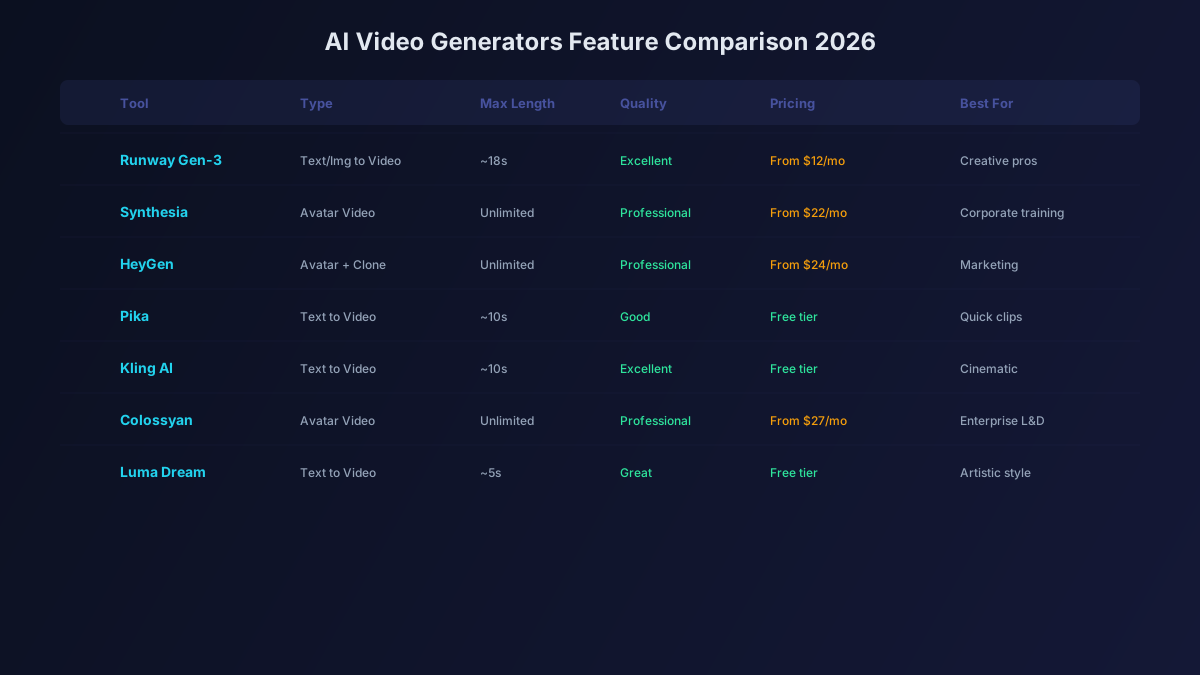
9. [HeyGen](/tools/heygen/)
Create professional presenter videos with AI avatars. The lip-sync quality is the best in the industry. Custom avatars from a 2-minute video recording.
Pricing: From $24/month.
10. [Synthesia](/tools/synthesia/)
Enterprise-grade AI avatar platform with 200+ stock avatars and 140+ language support. The go-to for corporate training and internal communications.
Pricing: From $29/month.
AI Stock-Footage Video
11. InVideo AI
Generate complete videos with stock footage, voiceover, music, and editing from a text prompt. Perfect for YouTube and social media content.
Pricing: From $25/month.
12. Pictory
Turn blog posts and scripts into videos with AI-selected stock footage, captions, and branding.
Pricing: From $19/month.
Comparison Table
| Tool | Type | Best Quality | Speed | Free Tier | Starting Price |
|---|---|---|---|---|---|
| Sora | Text-to-video | Cinematic | Slow | Via Plus | $20/mo (ChatGPT Plus) |
| Runway Gen-4 | Text-to-video | Professional | Medium | 125 credits | $12/month |
| Pika 2 | Text-to-video | Creative | Fast | Limited | $8/month |
| Kling | Text-to-video | Good | Medium | Generous | Free tier |
| Luma | Text-to-video | Artistic | Fast | Some | $10/month |
| HeyGen | AI Avatar | Realistic | Fast | Minutes | $24/month |
| Synthesia | AI Avatar | Professional | Fast | None | $29/month |
| InVideo AI | Stock-footage | Good | Fast | Limited | $25/month |
Which Tool Should You Use?
Short-form social content: Pika 2 (fast, creative, affordable) YouTube videos: InVideo AI (stock footage) or Sora (original footage) Corporate training: Synthesia (avatars, multilingual) Marketing videos: HeyGen (avatars) or Runway (cinematic) Film and creative projects: Sora (realism) or Runway (control) Repurposing content: Opus Clip (long-to-short) or Descript (editing)
The Bottom Line
AI video generation in 2026 is production-ready for most use cases. Sora leads on realism, Runway leads on control, Pika leads on creativity, and InVideo leads on convenience. Start with the free tiers, find your preferred style, and upgrade when you need more capacity. The cost of professional video content just dropped by 90%.