College in 2026 is a completely different game than even two years ago. The students who figure out how to use AI responsibly are outperforming everyone else.
This guide covers the best AI tools for students, organized by what you actually need them for. Every tool listed has a free tier or student discount.
Research and Information Gathering
[Perplexity AI](/tools/perplexity/)
The best starting point for any research project. Perplexity searches the web and provides cited answers that you can actually trace back to sources. Way more reliable than asking ChatGPT for facts.
Student tip: Use the "Focus" feature to search only academic sources.
Semantic Scholar
AI-powered academic search engine that understands paper relevance, not just keywords. The TLDR summaries save hours of skimming abstracts.
Connected Papers
Drop in a key paper and get a visual graph of related work. Incredible for literature reviews and finding papers you'd otherwise miss.
Consensus
AI that searches and extracts findings from scientific papers. Great for evidence-based research and finding what the science actually says about a topic.
Writing and Editing
[Claude](/tools/claude/)
The best AI writing assistant for students. Claude produces nuanced, well-structured writing and is excellent at explaining concepts you don't understand. Upload your lecture notes or textbook chapters and ask questions.
Student tip: Upload your assignment rubric along with your draft and ask Claude to identify areas that need improvement based on the criteria.
[Grammarly](/tools/grammarly/)
Essential for catching grammar, spelling, and style issues. The free tier is sufficient for most students. The premium tier adds tone detection and clarity suggestions.
QuillBot
Useful for paraphrasing when you understand a concept but struggle to express it in your own words. Never use it to paraphrase sources without proper citation.
[Notion AI](/tools/notion-ai/)
Organize all your notes, links, and assignments in Notion. The AI features help summarize long notes and generate study guides.
Study and Exam Prep
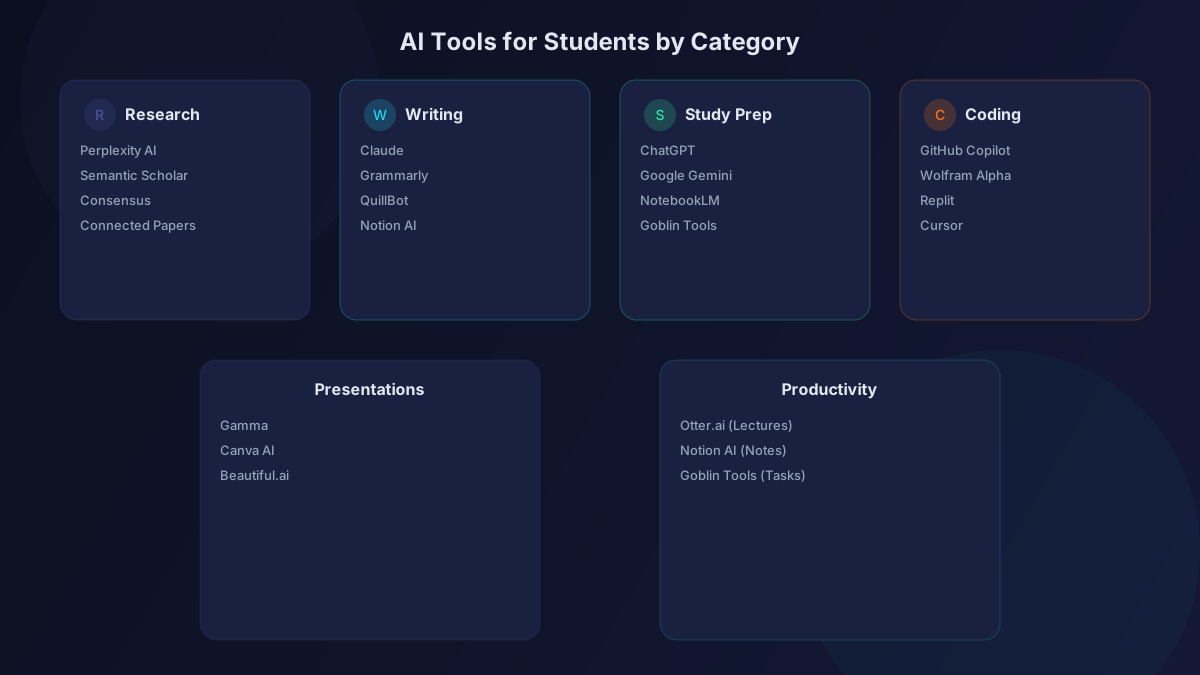
ChatGPT
Create practice quizzes from your study materials. ChatGPT excels at generating flashcards, practice problems, and explaining concepts in simpler terms. Upload your notes and say "Create 20 practice questions for an exam on this material."
[Google Gemini](/tools/gemini/)
Gemini's 1M token context window means you can upload entire textbooks and ask questions about specific chapters. The multimodal capabilities let you photograph diagrams and get explanations.
NotebookLM
Google's research notebook tool. Drop in your papers, notes, and study materials, then have conversations with your sources. It generates study guides and audio overviews automatically.
Coding and STEM
[GitHub Copilot](/tools/github-copilot/) (Free for Students)
Every student with a .edu email gets free GitHub Copilot. It autocompletes code, explains errors, and helps you learn programming faster.
Wolfram Alpha
Still the best tool for math, physics, and engineering problem-solving. Shows step-by-step solutions that help you learn, not just get answers.
Replit
Free cloud IDE with AI assistance. Great for coding assignments when you don't want to set up a local development environment.
Presentations and Visual Projects
[Gamma](/tools/gamma/)
Generate entire presentations from a text prompt. Perfect for class presentations when you have the content but limited design skills.
[Canva AI](/tools/canva-ai/)
Free design tool with AI features for creating posters, infographics, and slide decks. The student templates are polished and academic-appropriate.
Beautiful.ai
AI formats your slides as you add content. Great for consistent, professional-looking presentations.
Productivity and Organization
[Otter.ai](/tools/otter-ai/)
Record and transcribe lectures automatically. The free tier gives you 300 minutes per month.
Goblin Tools
Free tool that breaks down overwhelming tasks into manageable steps. Perfect for students with ADHD or anyone facing a huge project deadline.
Using AI Ethically in School
This matters. Most universities have AI policies now. Here's how to use AI responsibly:
- Always check your institution's policy. Some allow AI for research but not for final submissions. Know the rules.
- Cite AI usage. If your assignment was aided by AI, disclose it. Many style guides now have AI citation formats.
- Use AI to learn, not to bypass learning. Ask AI to explain concepts, not to write your essay. The goal is understanding, not a shortcut.
- Verify everything. AI makes mistakes. Always cross-reference facts with primary sources.
- Develop your own voice. Use AI to improve your writing, not to replace it. Your professors can tell the difference.
The Bottom Line
AI tools give students who use them wisely an enormous advantage. Start with Perplexity for research, Claude for writing help, and ChatGPT for study prep. Add specialized tools as needed. The students who master these tools while maintaining academic integrity will be the most prepared graduates of 2026.