The AI coding landscape has exploded. In 2026, you can go from an idea to a deployed app without writing a single line of code manually, or use AI to become 10x more productive as an experienced developer.
Here's every AI coding tool that matters, organized by how you'll actually use them.
AI Code Editors
[Cursor](/tools/cursor/)
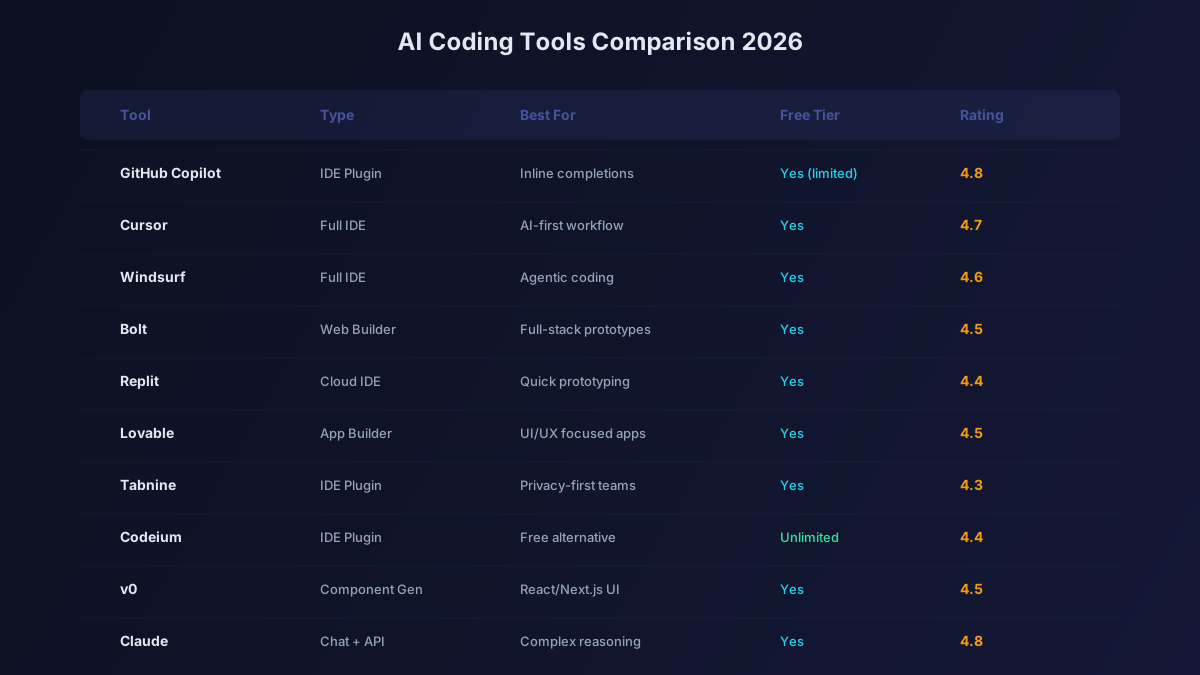
The gold standard for AI-enhanced coding. Cursor is a VS Code fork with AI deeply integrated: Tab completion predicts multi-line edits, Composer handles multi-file changes, and the chat understands your entire codebase.
Best for: Professional developers who want the most capable AI coding environment. Pricing: Free tier available, Pro from $20/month.
[Windsurf](/tools/windsurf/) (by [Codeium](/tools/codeium/))
Windsurf combines AI code completion with Cascade, an agentic system that can plan and execute multi-step coding tasks. The flow-aware approach means it understands what you're trying to build.
Best for: Developers who want agentic AI that maintains context across tasks. Pricing: Free tier, Pro from $15/month.
[GitHub Copilot](/tools/github-copilot/)
The most widely adopted AI coding assistant. Copilot works in VS Code, JetBrains, Neovim, and Xcode. The 2026 update adds Copilot Workspace for repository-level coding tasks and multi-model support.
Best for: Teams using GitHub who want seamless AI integration across their existing workflow. Pricing: Free for students/OSS, Individual $10/month, Business $19/month.
AI Code Completion
Supermaven
Claims the fastest code completion in the industry with a massive 1M token context window. When speed matters, Supermaven delivers suggestions before you finish thinking.
Best for: Speed-focused developers working with large codebases. Pricing: Free tier, Pro from $10/month.
[Tabnine](/tools/tabnine/)
Privacy-first AI code completion that can run on-premises. Popular in enterprises with strict compliance requirements.
Best for: Enterprise developers in regulated industries. Pricing: From $12/month.
Cline (Free, Open Source)
Open-source VS Code extension for AI-assisted coding. Bring your own API key from any provider. Supports Claude, GPT, DeepSeek, Gemini, and local models.
Best for: Cost-conscious developers who want model flexibility. Pricing: Free (you pay for API keys).
AI App Builders
Bolt
The fastest way to go from prompt to prototype. Type what you want and watch a full-stack app materialize in seconds with streaming code generation.
Best for: Rapid prototyping, MVPs, hackathon projects. Pricing: From $20/month.
Lovable
Produces the cleanest code of any AI app builder. React/Next.js focused with GitHub sync and Supabase integration. The code is production-quality, not just prototype-grade.
Best for: Production web apps with clean, maintainable code. Pricing: From $25/month.
v0 by Vercel
Specialized in generating beautiful React UI components with shadcn/ui and Tailwind CSS. The output is practically copy-paste ready for your Next.js projects.
Best for: Frontend components, UI design-to-code. Pricing: Free tier, Pro for more generations.
[Replit](/tools/replit/) Agent
Full cloud IDE with an AI Agent that builds and deploys applications from natural language. Supports 50+ languages and includes built-in hosting.
Best for: Full-stack development, learning to code, instant deployment. Pricing: From $25/month.
AI Coding Assistants (Chat-Based)
Claude (Anthropic)
Many developers prefer Claude for coding tasks because of its 200K context window and careful reasoning. Claude can analyze entire codebases and produce well-structured solutions.
[ChatGPT](/tools/chatgpt/) (OpenAI)
GPT-5.4 and o3 are strong coding models. ChatGPT's advantage is the plugin ecosystem and ability to execute code directly.
DeepSeek
DeepSeek-R1's chain-of-thought reasoning produces exceptional code, especially for algorithmic problems. The API is 10x cheaper than competitors.
Specialized Developer Tools
Claude Code (CLI)
Anthropic's terminal-based AI coding tool. Run it in your project directory and it can read files, write code, execute commands, and manage git. Works like having a senior developer in your terminal.
OpenAI Codex CLI
OpenAI's answer to Claude Code. Terminal-based coding assistant that understands your project context.
Devin
The first fully autonomous AI software engineer. Give it a task and it spins up its own development environment, writes code, tests it, and deploys.
How to Choose the Right AI Coding Tools
Your ideal setup depends on your role:
Solo developer: Cursor + Claude for chat + Lovable for quick projects.
Team at a startup: GitHub Copilot + Cursor for coding + Bolt for prototypes.
Enterprise developer: GitHub Copilot Business + Tabnine for privacy + your company's approved models.
Student: GitHub Copilot (free) + Replit (free) + DeepSeek (free).
Non-developer building an app: Lovable or Bolt. Start there and scale with real developers later.
The Bottom Line
AI hasn't replaced developers. It's made good developers extraordinarily productive. The tools listed here can help you write code faster, build apps from scratch, debug issues instantly, and focus on the creative problem-solving that humans do best. Start with one tool from each category, master it, and expand your toolkit as needed.