Teachers are overwhelmed. Between lesson planning, grading, administrative tasks, and actually teaching, there aren't enough hours in the day. AI tools are changing that equation.
Here's every AI tool that's worth your time as an educator, organized by how it helps.
Lesson Planning
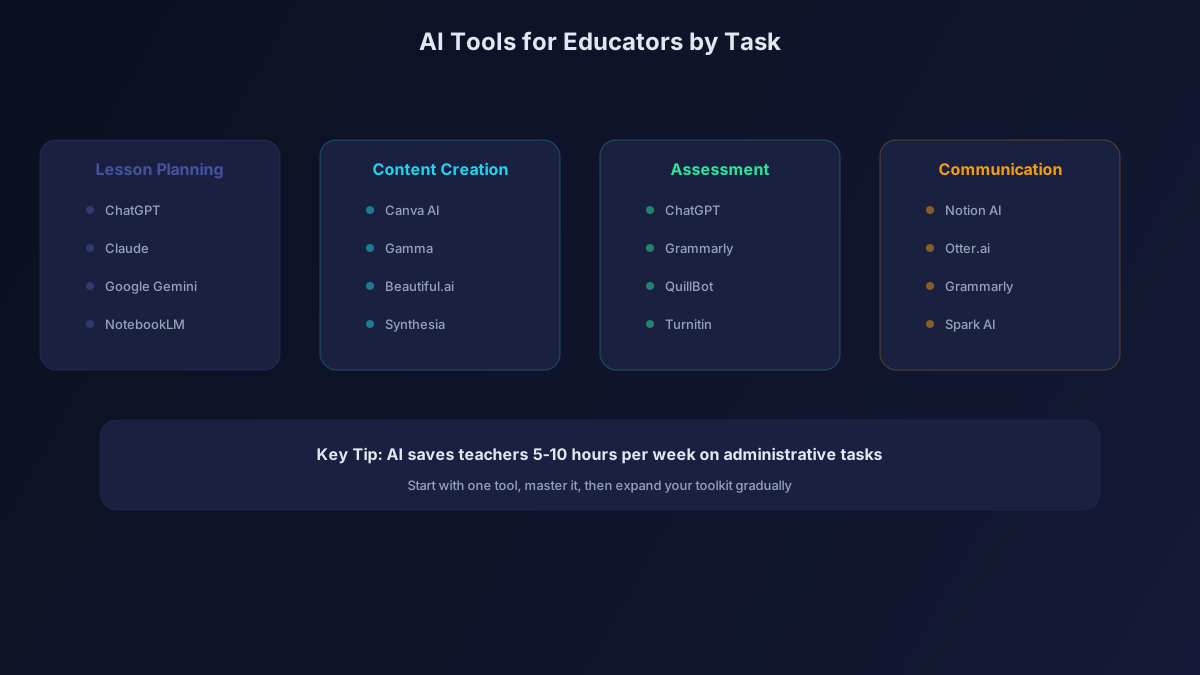
[ChatGPT](/tools/chatgpt/) / [Claude](/tools/claude/)
The most versatile tools for lesson planning. Describe your topic, grade level, and learning objectives, and get complete lesson plans with activities, discussion questions, and assessments.
Teacher tip: Upload your curriculum standards document and ask AI to generate lesson plans aligned to specific standards.
Example prompt: "Create a 50-minute lesson plan for 10th grade biology on cell division. Include a 5-minute opener, 20-minute guided instruction, 15-minute hands-on activity, and 10-minute assessment. Align to [your state] standards."
Gemini
Upload your textbook chapters (photos or PDFs) and ask Gemini to create lesson plans directly from the content. The multimodal capability is perfect for working with existing materials.
Creating Materials
[Canva AI](/tools/canva-ai/)
Design worksheets, flashcards, posters, and classroom materials with professional-quality templates. The education-specific templates save enormous time.
[Gamma](/tools/gamma/)
Create student-facing presentations and study guides in minutes. Share interactive quizzes within the presentation.
Napkin AI
Turn text explanations into visual diagrams. Perfect for creating concept maps, process flows, and visual organizers.
Ideogram
Generate educational visuals with accurate text labels. Create vocabulary cards, infographics, and illustrative materials.
Assessment and Grading
ChatGPT / Claude
Generate quizzes, rubrics, and test questions from your content. Ask AI to create questions at different Bloom's taxonomy levels for differentiated assessment.
Teacher tip: "Create a 20-question quiz on [topic] with 5 recall questions, 5 comprehension questions, 5 application questions, and 5 analysis questions. Include an answer key."
[Grammarly](/tools/grammarly/)
Use the free tier to help students with grammar feedback. The premium tier can provide more detailed writing feedback for essay-based assignments.
Research and Professional Development
Perplexity
Research new teaching strategies, find relevant studies on educational methods, and stay current on your subject matter. The citations make it easy to verify information.
NotebookLM
Upload your professional reading materials, conference notes, and PD documents. Ask questions and get insights synthesized from all your materials.
Semantic Scholar
Find research-backed teaching strategies and academic papers on educational methods.
Student Support
Goblin Tools
Free AI tool that breaks down assignments into manageable steps. Recommend it to students who struggle with executive function or feel overwhelmed by large projects.
Wolfram Alpha
Essential for math and science teachers. Students can see step-by-step solutions. Use it to verify answers and create worked examples.
Administrative Tasks
Otter.ai
Transcribe parent-teacher conferences, department meetings, and IEP meetings. Generate summaries and action items automatically.
[Notion AI](/tools/notion-ai/)
Organize your curriculum, class notes, student information, and administrative documents in one AI-enhanced workspace.
Zapier AI
Automate repetitive tasks like sending parent update emails, organizing assignment submissions, and updating grade records.
Practical Use Cases with Examples
Differentiating Instruction
Upload a lesson and ask AI: "Modify this lesson for three levels: below grade level, at grade level, and above grade level. Keep the core learning objective the same but adjust complexity, vocabulary, and assessment."
Creating Rubrics
"Create an analytical rubric for a persuasive essay assignment. Include 4 categories: thesis and argument, evidence and reasoning, organization, and writing conventions. Include descriptions for exceeding, meeting, approaching, and below expectations."
Parent Communication
"Write a professional email to parents about an upcoming field trip to the science museum. Include date, time, cost, what students need to bring, permission slip deadline, and a positive note about what students will learn."
Writing Feedback
Upload a student essay (with name removed) and ask: "Provide specific, encouraging feedback on this essay. Identify 2-3 strengths and 2-3 areas for improvement. Suggest concrete next steps for revision."
Ethical Guidelines for AI in Education
- Never upload identifiable student data to AI tools. Remove names and identifying information from any student work you share with AI.
- Be transparent. Tell students and parents when you use AI in your teaching.
- Verify AI output. AI makes mistakes. Always review generated content for accuracy, especially in subjects where misinformation could be harmful.
- Teach AI literacy. Help students understand how to use AI responsibly. This is now an essential life skill.
- Don't automate the human parts. AI handles logistics and content creation. You provide relationships, motivation, and the irreplaceable human elements of teaching.
Time Savings Breakdown
| Task | Traditional Time | With AI | Weekly Savings |
|---|---|---|---|
| Lesson planning | 5 hours/week | 2 hours/week | 3 hours |
| Creating materials | 3 hours/week | 1 hour/week | 2 hours |
| Writing assessments | 2 hours/week | 0.5 hours/week | 1.5 hours |
| Parent emails | 2 hours/week | 0.5 hours/week | 1.5 hours |
| Total | 12 hours/week | 4 hours/week | 8 hours |
The Bottom Line
AI saves teachers approximately 8 hours per week on administrative and planning tasks. That's 8 hours you can reinvest in what matters: teaching, building relationships with students, and taking care of yourself. Start with ChatGPT for lesson planning this week, and expand from there.