If you create content for a living, 2026 is going to feel like a cheat code. AI tools have gotten so good that a single creator can now produce what used to require an entire team: polished articles, professional videos, studio-quality voiceovers, and scroll-stopping graphics.
But here's the problem. There are hundreds of AI tools out there, and most of them overlap. You don't need all of them. You need the right ones.
This guide breaks down the best AI tools for content creators across every category, what they cost, how to use them together, and how to build a complete creator stack without breaking the bank.
Let's get into it.
The Content Creator's AI Toolkit
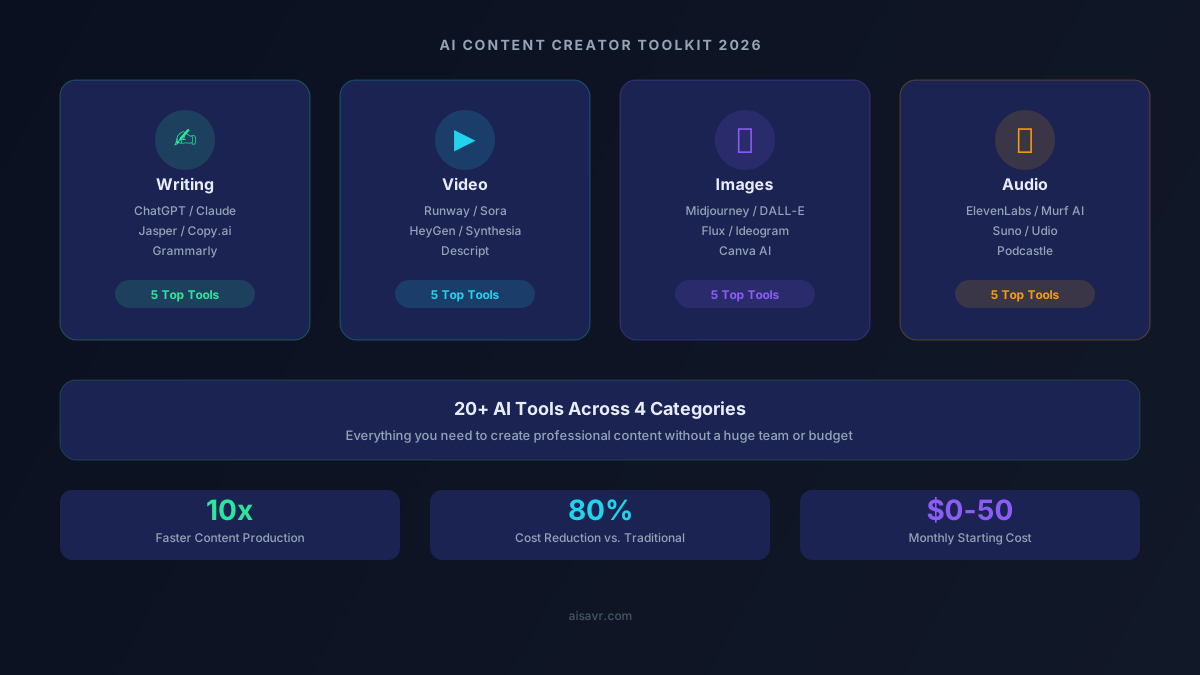
Think of your AI toolkit in four categories: writing, video, images, and audio. Each category has standout tools that do one thing really well. The secret is picking one or two from each category instead of subscribing to everything.
Here's the breakdown.
Writing Tools
1. ChatGPT (GPT-5.4)
ChatGPT remains the most versatile writing assistant in 2026. Whether you need blog outlines, social media captions, email newsletters, or full articles, it handles everything. The free tier gives you access to GPT-4o, which is still very capable. ChatGPT Plus at $20/month unlocks GPT-5.4 and the image generation features.
Best for: All-purpose writing, brainstorming, research, and quick drafts.
2. Claude (Sonnet 4)
Claude from Anthropic is the writer's AI. It produces longer, more nuanced content with better tone control than any competitor. If you write long-form blog posts, newsletters, or in-depth articles, Claude's 200K context window lets you work with massive documents. The free tier is generous, and the Pro plan is $20/month.
Best for: Long-form content, analysis, editing, and maintaining a consistent voice.
3. Jasper
Jasper is built specifically for marketing teams and content creators. Its brand voice feature lets you train it on your existing content so it writes in your style. It also has built-in SEO optimization and content templates. Starting at $49/month, it's pricier, but worth it if you produce high volumes of marketing content.
Best for: Marketing copy, brand-consistent content, and SEO-optimized articles.
4. Grammarly
Grammarly isn't technically a writing AI, but it's essential for content creators. The AI-powered suggestions go beyond grammar: tone detection, clarity improvements, and full paragraph rewrites. The free tier catches basic errors, and Premium at $12/month adds the advanced AI features.
Best for: Editing, proofreading, and tone adjustments on any content.
5. Copy.ai
Copy.ai excels at short-form content: social media posts, ad copy, product descriptions, and email subject lines. It has a solid free tier with 2,000 words/month, and the Pro plan at $49/month gives unlimited words plus workflow automation features.
Best for: Social media content, ad copy, and quick marketing text.
Video Tools
1. Runway (Gen-3 Alpha)
Runway continues to lead in AI video editing and generation. It can generate video clips from text prompts, remove backgrounds, replace objects, and apply AI effects. The free tier gives you limited credits to experiment, and the Standard plan starts at $12/month.
Best for: AI video effects, text-to-video generation, and professional editing.
2. HeyGen
HeyGen creates AI avatar videos where a realistic digital human presents your script. Perfect for product explainers, training videos, and YouTube content where you don't want to be on camera. It also offers real-time video translation into 40+ languages. Plans start at $24/month.
Best for: Talking-head videos, product demos, and multilingual content.
3. Descript
Descript lets you edit video and audio as easily as editing a Word document. Delete a word from the transcript, and it removes it from the video. It also generates filler-word removal, studio sound enhancement, and AI eye contact correction. The free tier includes one hour of transcription, with Pro at $24/month.
Best for: Podcast editing, tutorial videos, and transcript-based editing.
4. Opus Clip
Opus Clip takes your long-form videos and automatically cuts them into short, viral-ready clips for TikTok, YouTube Shorts, and Instagram Reels. It uses AI to identify the most engaging moments and adds captions automatically. Free tier allows 5 clips/month, with Pro at $15/month.
Best for: Repurposing long videos into short-form content.
5. Synthesia
Synthesia generates professional training and explainer videos using AI avatars and your script. Unlike HeyGen, it specializes in corporate and educational content with built-in slide integration. Plans start at $22/month.
Best for: Corporate training videos, educational content, and presentations.
Image Tools
1. Midjourney
Midjourney produces the highest-quality AI images available. Its v7 model creates photorealistic and artistic images that rival professional photography. The downside: no free tier. The Basic plan starts at $10/month for ~200 images. You access it through Discord or the web app.
Best for: Blog featured images, social media visuals, and artistic imagery.
2. DALL-E 3
DALL-E 3, built into ChatGPT, is the easiest AI image generator to use. Just describe what you want in plain English, and it creates it. It's particularly good at images with text, infographics, and mockups. Free users get limited generations; ChatGPT Plus gives more.
Best for: Quick mockups, images with text, and beginner-friendly generation.
3. Canva AI
Canva's AI features turn it from a design tool into a full creative suite. Magic Design generates complete layouts, Magic Eraser removes objects, and the text-to-image generator creates custom graphics. The free tier is generous, with Pro at $13/month.
Best for: Social media graphics, presentations, and branded templates.
4. Ideogram
Ideogram is the best AI tool for images that contain text, like logos, posters, and social graphics. While Midjourney excels at photography and art, Ideogram's text rendering is nearly perfect. It has a generous free tier with 10 images/day.
Best for: Logos, posters, graphics with text, and typography-heavy designs.
5. Flux
Flux is the open-source powerhouse. The Schnell model is completely free, the Dev model is free for non-commercial use, and the Pro model is available through APIs at very low cost. Image quality rivals Midjourney for many use cases.
Best for: High-volume image generation, developers, and budget-conscious creators.
Audio Tools
1. ElevenLabs
ElevenLabs is the gold standard for AI voiceovers. It generates human-quality speech in dozens of voices, supports voice cloning, and handles multiple languages. The free tier gives 10,000 characters/month, with the Starter plan at $5/month.
Best for: Voiceovers, narration, audiobook production, and dubbing.
2. Suno AI
Suno generates full songs from text descriptions, complete with vocals, instruments, and production. It's perfect for background music, intros, and jingles. The free tier generates 10 songs/day, and Pro is $10/month.
Best for: Original music, podcast intros, and background tracks.
3. Murf AI
Murf AI focuses on professional voiceovers for e-learning, presentations, and marketing videos. It has 120+ voices in 20+ languages with fine-grained control over tone, speed, and emphasis. The Creator plan starts at $23/month.
Best for: Professional voiceovers, e-learning narration, and presentations.
4. Podcastle
Podcastle is an all-in-one podcast creation platform with AI-powered recording, editing, and enhancement. It removes background noise, enhances audio quality, and auto-generates transcripts. Free tier available, with Pro at $12/month.
Best for: Podcast recording, audio cleanup, and production.
5. Udio
Udio generates music with impressive genre range and production quality. It competes directly with Suno and excels at instrumental tracks, ambient music, and genre-specific compositions. The free tier is generous, with Pro at $10/month.
Best for: Instrumental music, ambient tracks, and genre-specific compositions.
The Content Creation Workflow
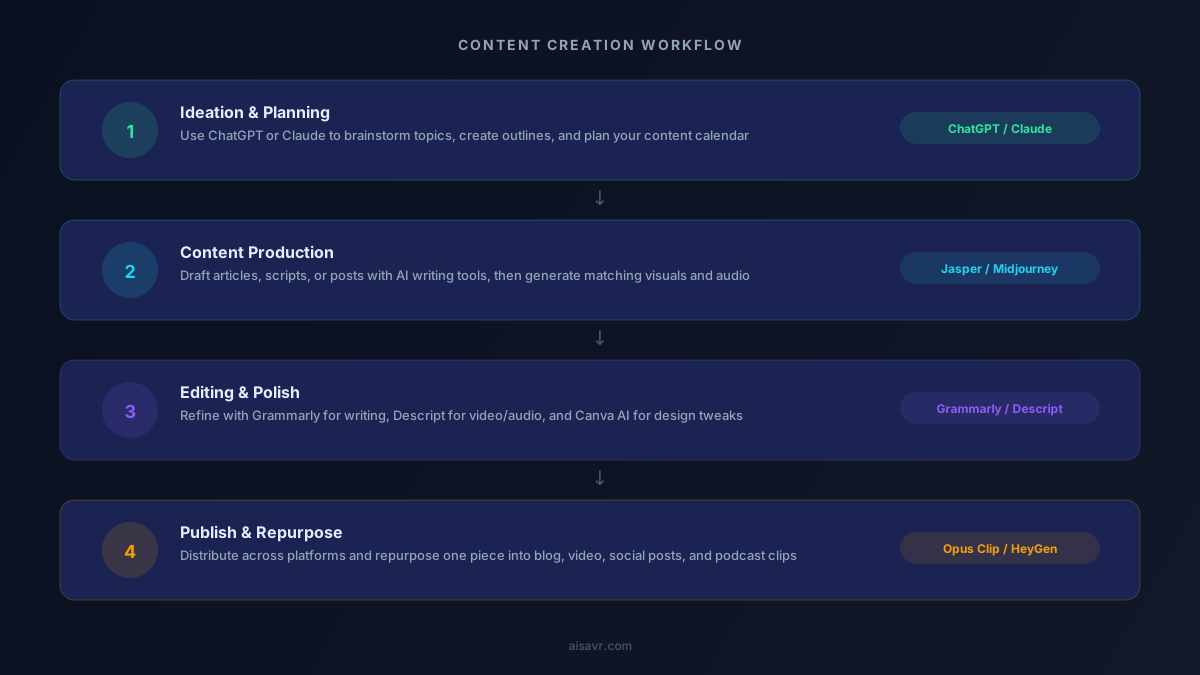
Here's how a modern content creator uses AI tools together in a typical weekly workflow:
Monday: Planning Use ChatGPT or Claude to brainstorm content ideas for the week. Generate outlines for blog posts, video scripts, and social media themes. This takes 30 minutes instead of 3 hours.
Tuesday-Wednesday: Production Write articles with Claude for long-form or ChatGPT for shorter pieces. Generate custom images with Midjourney or Ideogram. Record video with Descript or create AI avatar videos with HeyGen.
Thursday: Editing Polish writing with Grammarly. Edit video in Descript using transcript-based editing. Enhance audio with Podcastle or ElevenLabs. Finalize graphics in Canva.
Friday: Publishing and Repurposing Publish your main content piece. Use Opus Clip to cut long videos into shorts. Ask ChatGPT to rewrite your blog post as a Twitter thread, LinkedIn post, and newsletter. Schedule everything.
Result: What used to take a 5-person team now takes one creator working 4-5 hours per day.
Pricing Comparison
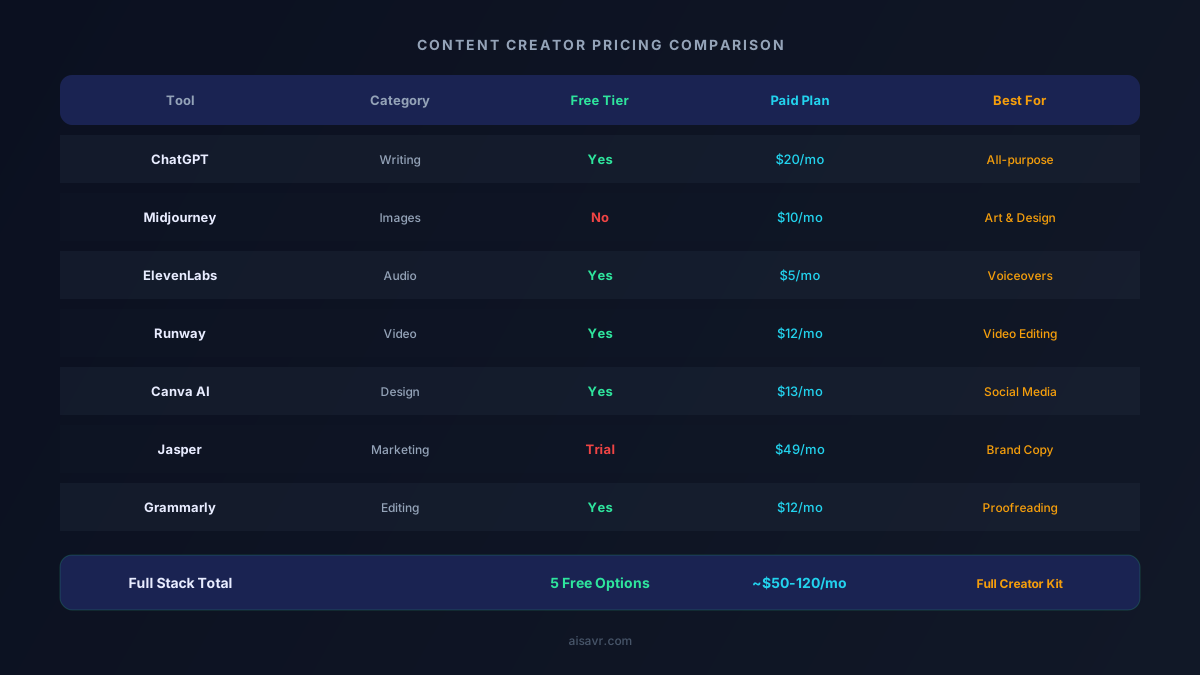
The biggest misconception about AI tools is that you need a huge budget. Here's the reality:
Budget Stack ($0/month): ChatGPT Free + DALL-E Free + Canva Free + ElevenLabs Free + Ideogram Free. This covers basic writing, images, design, voiceovers, and graphics at zero cost.
Creator Stack (~$50/month): ChatGPT Plus ($20) + Midjourney Basic ($10) + Canva Pro ($13) + ElevenLabs Starter ($5). This gives you professional-quality tools across all categories.
Pro Stack (~$120/month): Add Claude Pro ($20) + Runway Standard ($12) + Descript Pro ($24) + Opus Clip Pro ($15) for full video editing and premium writing.
Most solo creators can produce professional content with the $50/month stack. That's less than a single stock photo subscription cost five years ago.
Who Should Use What
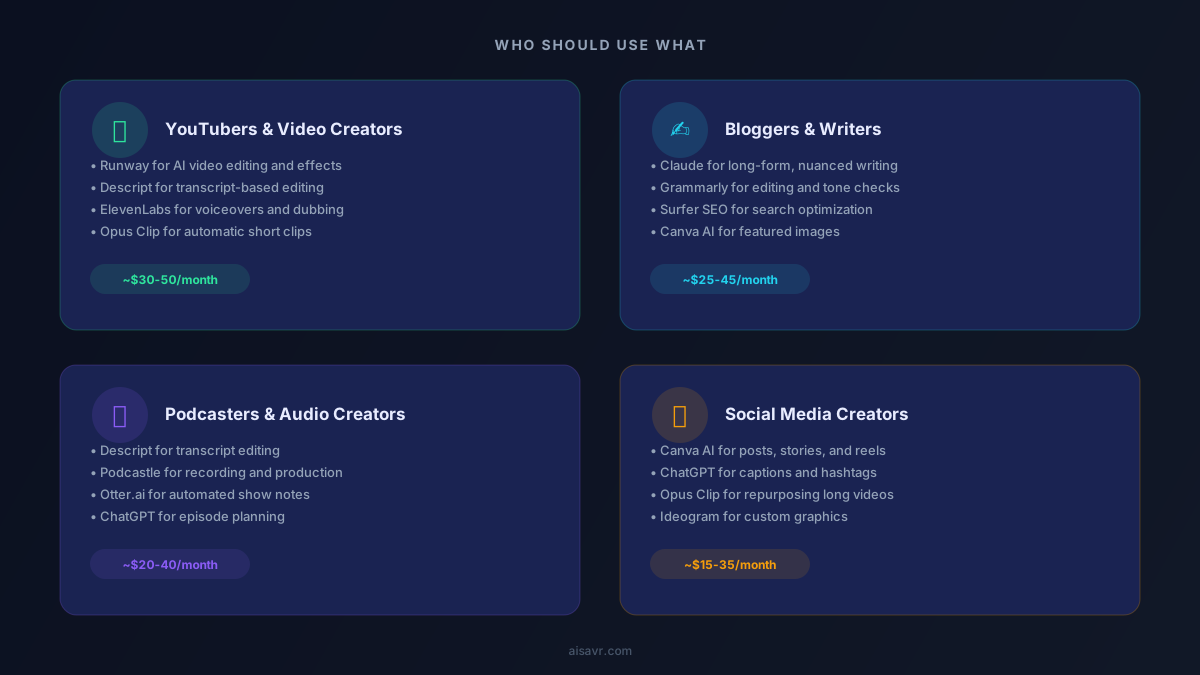
YouTubers
Start with Descript for editing, ElevenLabs for voiceovers, Opus Clip for shorts, and Midjourney for thumbnails. Budget: ~$40-60/month.
Bloggers and Newsletter Writers
Claude for writing, Grammarly for editing, Surfer SEO for optimization, and Canva AI for featured images. Budget: ~$25-45/month.
Podcasters
Descript for recording and editing, Podcastle for audio enhancement, Otter.ai for show notes, and ChatGPT for episode planning. Budget: ~$20-40/month.
Social Media Creators
Canva AI for designs, ChatGPT for captions and hashtags, Opus Clip for video clips, and Ideogram for graphics with text. Budget: ~$15-35/month.
Common Mistakes to Avoid
1. Subscribing to too many tools. Pick one per category and master it before adding more.
2. Using AI output without editing. AI generates drafts, not final products. Always add your voice and perspective.
3. Ignoring the free tiers. Most tools have generous free plans. Start there and upgrade only when you hit the limits.
4. Not building templates. Create reusable prompts and workflows. A good ChatGPT prompt template saves you 10 minutes every time you use it.
5. Forgetting your unique voice. AI makes content easier to produce, but your personality is what keeps people coming back. Use AI for the heavy lifting, then inject your perspective.
Getting Started: Your First Week
- Day 1: Sign up for ChatGPT (free) and brainstorm 10 content ideas using a detailed prompt.
- Day 2: Try Claude (free tier) for a long-form blog post. Compare the output to ChatGPT.
- Day 3: Create 5 images with Ideogram (free) or DALL-E through ChatGPT.
- Day 4: Generate a voiceover with ElevenLabs (free tier) for a short video.
- Day 5: Design 3 social media posts in Canva AI (free tier) using your generated images.
- Day 6: Record and edit a short video or podcast clip in Descript (free tier).
- Day 7: Review what worked. Decide which tools to continue using and what to upgrade.
By the end of the week, you'll have created more content than most people produce in a month, and most of it was free.
The Bottom Line
AI tools in 2026 have leveled the playing field for content creators. A solo creator with the right toolkit can produce professional-quality content across writing, video, images, and audio for $50/month or less.
The key isn't finding the "best" AI tool. It's building a workflow that fits your content style and sticking with it. Start free, learn the tools, and upgrade only when you need to.
Your content quality depends more on your ideas and perspective than on which AI generates the first draft. Use AI to handle the production work so you can focus on what actually matters: creating content your audience cares about.