Running a small business means doing everything yourself, or close to it. Marketing, customer support, accounting, hiring, social media, email, the list never ends.
AI tools can take hours of repetitive work off your plate every week. Not someday, right now. The tools available in 2026 are affordable, easy to use, and genuinely useful for small businesses.
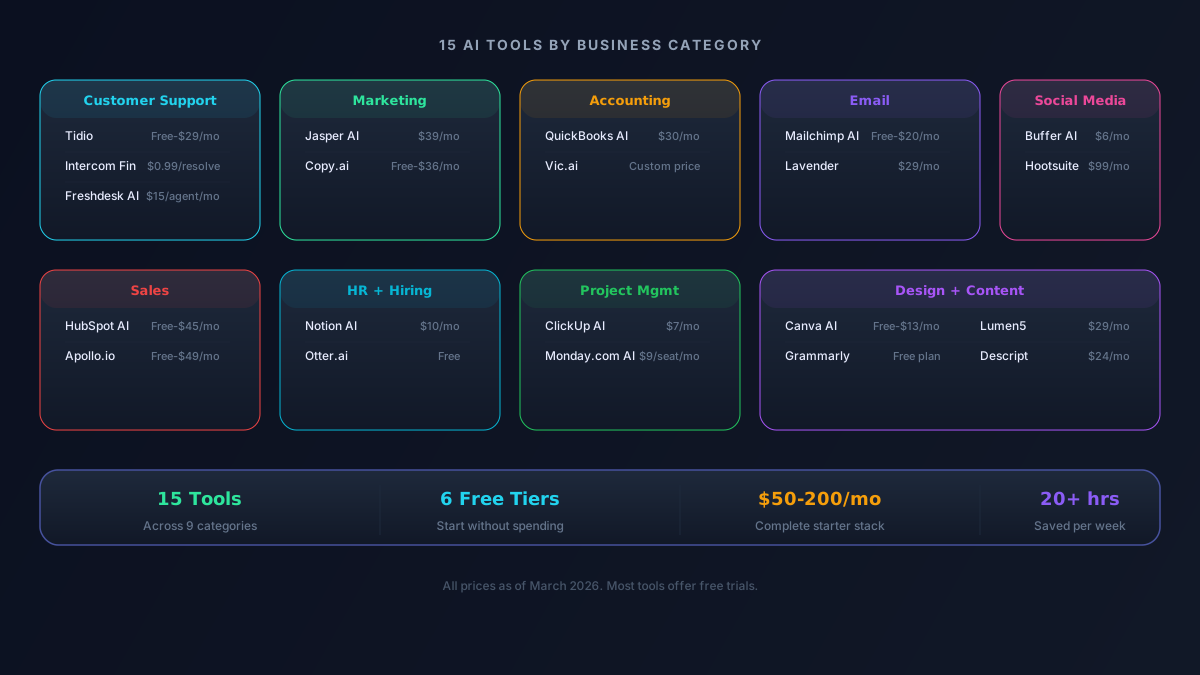
This guide covers the 15 best AI tools for small businesses, organized by what they actually help you do. No fluff, just practical recommendations with real pricing.
Customer Support
1. ChatGPT for Business Queries
Before paying for any fancy tool, start with ChatGPT. It can draft customer email responses, create FAQ documents, write help articles, and even help you handle tricky customer situations.
Use it for: Drafting customer emails, creating response templates, writing FAQ pages, handling complaint responses.
Cost: Free (or $20/month for Plus with higher limits)
Time saved: 5-10 hours per week on customer communication
2. Tidio
Tidio is an AI chatbot you can add to your website in minutes. It answers common customer questions 24/7, captures leads, and only sends complex issues to you.
What it does:
- Answers customer questions automatically using your FAQ and website content
- Captures email addresses from visitors
- Routes complex questions to you via email or live chat
- Works on any website (WordPress, Shopify, Wix, custom sites)
Cost: Free for up to 50 conversations/month. Paid plans from $29/month.
Best for: E-commerce stores, service businesses, and anyone who gets repetitive questions.
3. Intercom with AI
If you're a growing business with more customer interactions, Intercom's AI agent (called Fin) can resolve up to 50% of support tickets automatically. It's more expensive than Tidio but much more powerful.
Cost: From $39/month plus $0.99 per AI-resolved conversation.
Best for: Businesses handling 100+ support interactions per month.
Marketing and SEO
4. Jasper
Jasper is built specifically for marketing teams. It creates blog posts, ad copy, email campaigns, social media posts, and landing page content while maintaining your brand voice.
What makes it different from ChatGPT:
- Built-in brand voice training (feed it your existing content and it matches your style)
- Marketing-specific templates for every type of content
- SEO integration for content that ranks
- Team collaboration features
Cost: From $49/month (Creator plan). Business plans from $69/month.
Best for: Businesses that produce a lot of marketing content and want it to sound consistent.
5. Surfer SEO
Surfer analyzes top-ranking pages for your target keywords and tells you exactly what your content needs to rank: word count, headings, related terms, and content structure.
What it does:
- Analyzes your competitors' content structure
- Gives you a content score as you write
- Suggests keywords and topics to include
- Integrates with Google Docs and WordPress
Cost: From $79/month (Essential plan).
Best for: Any business that relies on Google traffic. If customers find you through search, Surfer pays for itself fast.
Accounting and Finance
6. QuickBooks AI
QuickBooks has added AI features that automatically categorize transactions, flag unusual expenses, predict cash flow, and generate financial insights.
AI features you'll actually use:
- Auto-categorize bank transactions (saves hours of manual entry)
- Smart invoice reminders based on client payment patterns
- Cash flow forecasting
- Expense anomaly detection (catches duplicate charges, unusual amounts)
Cost: From $30/month (Simple Start). Plus plan at $60/month.
Best for: Any small business that needs to track income, expenses, and invoices.
7. Xero AI
Xero is QuickBooks' main competitor and offers similar AI features. It's particularly popular with service-based businesses and has excellent bank reconciliation AI.
Cost: From $15/month (Starter). Growing plan at $42/month.
Best for: Service businesses, freelancers, and businesses outside the US (Xero has strong international support).
Social Media
8. Buffer AI
Buffer now has AI built into its social media scheduling tool. It can generate post ideas, write captions, suggest hashtags, and recommend the best times to post based on your audience data.
What it does:
- Generate social media posts from a topic or URL
- Repurpose long content into multiple social posts
- A/B test different post variations
- Schedule across Instagram, LinkedIn, X, Facebook, and TikTok
- Analytics to see what's working
Cost: Free for 3 channels. Paid plans from $6/month per channel.
Best for: Small businesses managing their own social media. The pricing is very reasonable for what you get.
9. Canva AI
Canva has become the go-to design tool for small businesses, and its AI features make it even more powerful. Generate images, remove backgrounds, resize designs for every platform, and create brand kits automatically.
Most useful AI features:
- Magic Design: describe what you want and get a complete design
- Background removal in one click
- Magic Resize: turn one design into every social media format
- Brand Kit: ensures all your designs use your colors, fonts, and logo
- Text to Image: generate custom images from descriptions
Cost: Free plan is generous. Pro at $13/month unlocks all AI features.
Best for: Every small business. Seriously, if you create any visual content, Canva is essential.
Email Marketing
10. Mailchimp AI
Mailchimp's AI can write email subject lines, generate email content, optimize send times, predict which subscribers are likely to buy, and create customer segments automatically.
AI features worth using:
- Subject line generator (test multiple options)
- Content optimizer (suggests improvements)
- Send time optimization (emails hit inboxes when subscribers are most active)
- Predictive segmentation (target subscribers most likely to convert)
Cost: Free for up to 500 contacts. Essentials from $13/month.
Best for: Small businesses with an email list of any size. Email marketing still has the highest ROI of any marketing channel.
11. Brevo (formerly Sendinblue)
Brevo is a more affordable alternative to Mailchimp with strong AI features. It includes email, SMS, and WhatsApp marketing in one platform.
Cost: Free for 300 emails/day. Paid plans from $9/month.
Best for: Budget-conscious businesses that want email plus SMS marketing.
Sales and CRM
12. HubSpot AI (Free CRM)
HubSpot's free CRM now includes AI features that help small businesses manage leads, track deals, and automate follow-ups.
What the free tier includes:
- Contact management with AI-powered insights
- Email tracking (know when prospects open your emails)
- AI-generated email drafts for follow-ups
- Meeting scheduling
- Basic reporting and deal pipeline
Cost: Free CRM with AI basics. Starter plan at $20/month for more features.
Best for: Any business that sells products or services and needs to track leads and customers.
HR and Hiring
13. Notion AI for Internal Operations
Notion AI turns Notion into a powerful internal knowledge base. It can answer employee questions, summarize meeting notes, create onboarding documents, and manage projects.
Useful for small businesses:
- Create an employee handbook that AI can answer questions about
- Summarize meeting notes and pull out action items
- Draft job descriptions based on a role outline
- Organize company SOPs (standard operating procedures)
- Project management with smart templates
Cost: Free for personal use. Team plans from $10/user/month.
Best for: Businesses with 2-50 employees who need internal documentation and project management.
Project Management
14. ClickUp AI
ClickUp has added AI across its project management platform. It can write task descriptions, summarize project updates, generate status reports, and help prioritize tasks.
What saves the most time:
- Auto-generate task descriptions from brief notes
- Summarize long comment threads into key decisions
- Create status reports for clients or stakeholders
- Smart task prioritization based on deadlines and dependencies
Cost: Free forever plan available. Paid plans from $7/user/month.
Best for: Businesses managing multiple projects or client work who want AI-powered productivity.
Design and Branding
15. Looka (AI Logo and Brand Design)
Need a logo, brand kit, or business cards? Looka uses AI to generate professional branding based on your industry, style preferences, and business name.
What you get:
- AI-generated logo designs (hundreds of options)
- Complete brand kit (colors, fonts, logo variations)
- Business card designs
- Social media brand templates
- Brand guidelines document
Cost: One-time logo purchase from $20. Brand kit from $96.
Best for: New businesses that need professional branding without hiring a designer.
The Small Business AI Starter Stack
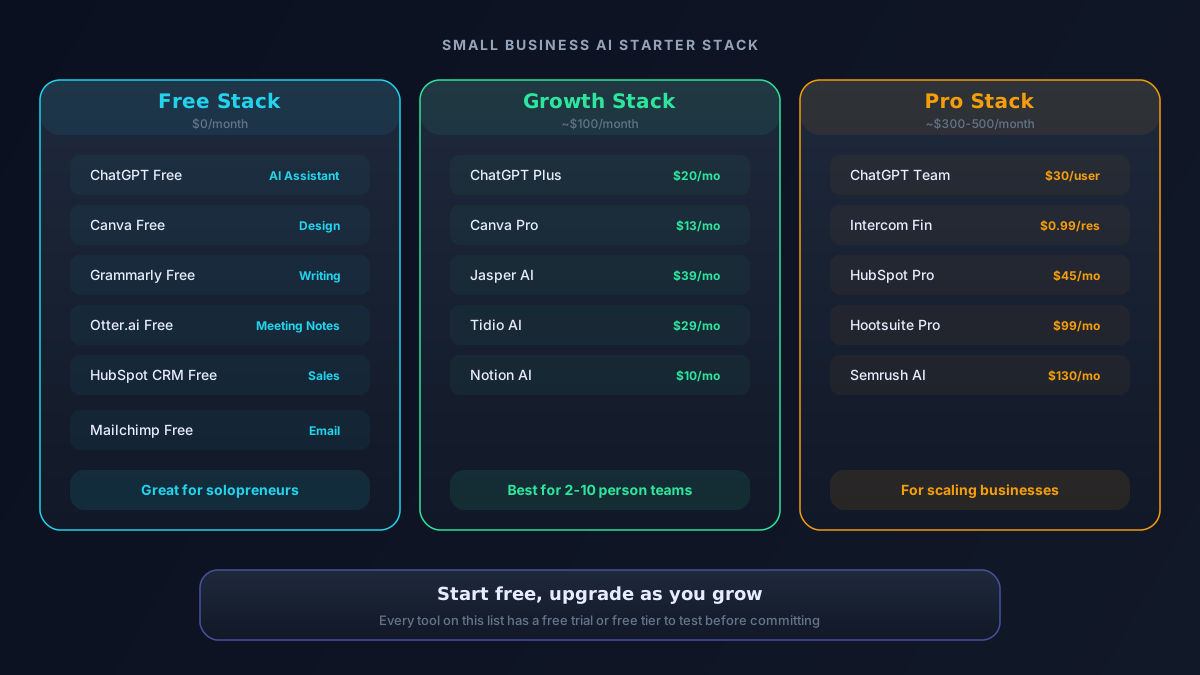
If you're just getting started with AI, here's the recommended stack that covers the essentials:
| Need | Tool | Monthly Cost |
|---|---|---|
| General assistant | ChatGPT Free | $0 |
| Customer support | Tidio Free | $0 |
| Social media | Buffer Free + Canva Free | $0 |
| Email marketing | Mailchimp Free | $0 |
| CRM | HubSpot Free | $0 |
| Accounting | QuickBooks Simple Start | $30 |
| Project management | ClickUp Free | $0 |
Total: $30/month for a complete AI-powered business toolkit. That's less than a single lunch meeting.
As your business grows, upgrade to paid tiers where you're hitting free limits.
How Much Time Can You Actually Save?
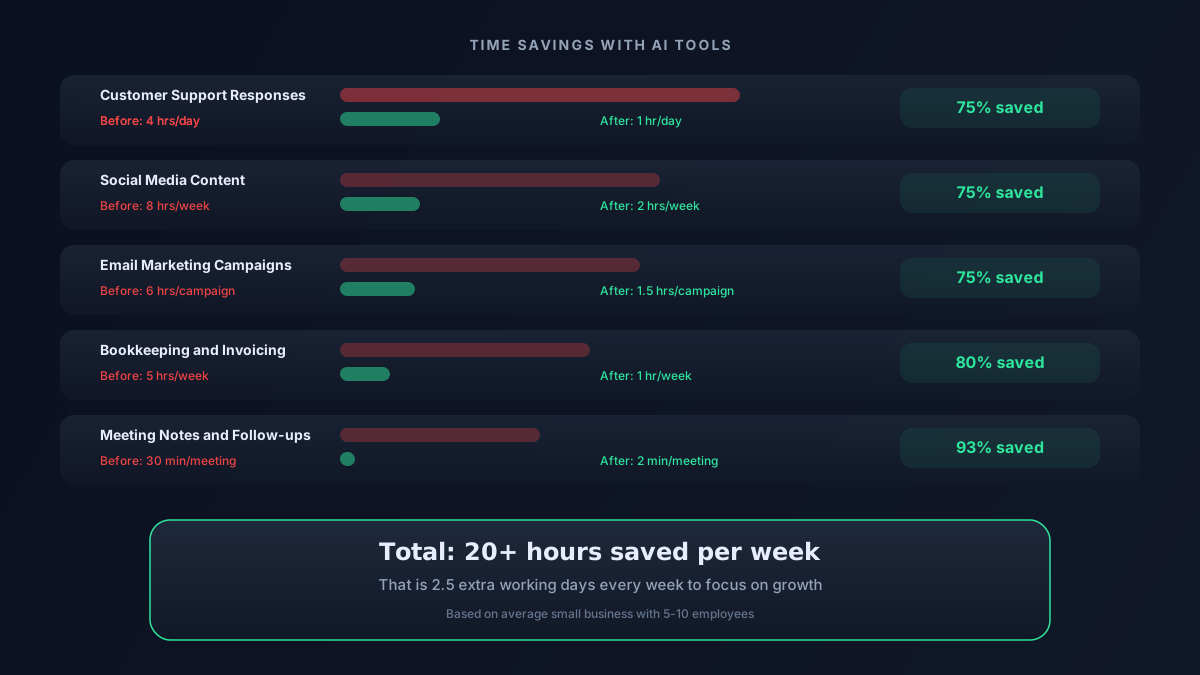
Based on feedback from small business owners using these tools:
- Customer support: 8-12 hours/week saved with AI chatbots handling common questions
- Content creation: 5-8 hours/week saved with AI-assisted writing and design
- Email marketing: 3-5 hours/week saved with AI-generated campaigns and automation
- Accounting: 3-4 hours/week saved with auto-categorization and smart reports
- Social media: 4-6 hours/week saved with AI content generation and scheduling
That's 23-35 hours per week of time saved. For a small business owner, that's essentially getting a part-time employee for the cost of a few software subscriptions.
Tips for Getting Started
1. Start with One Problem
Don't try to implement everything at once. Pick the one area that eats the most of your time and start there. For most businesses, that's either customer support or content creation.
2. Use Free Tiers First
Almost every tool on this list has a free tier. Test it with your real workflows before paying. You'll know within a week whether it's worth upgrading.
3. Set Up Templates
The biggest time savings come from templates. Spend an hour creating email templates, response templates, and content outlines in your AI tools. Then reuse them hundreds of times.
4. Train Your Team
If you have employees, spend 30 minutes showing them how to use these tools. The compounding time savings across your team is significant.
5. Review AI Output
Always review what AI generates before it reaches your customers. AI makes mistakes, and one bad automated email can damage customer trust.
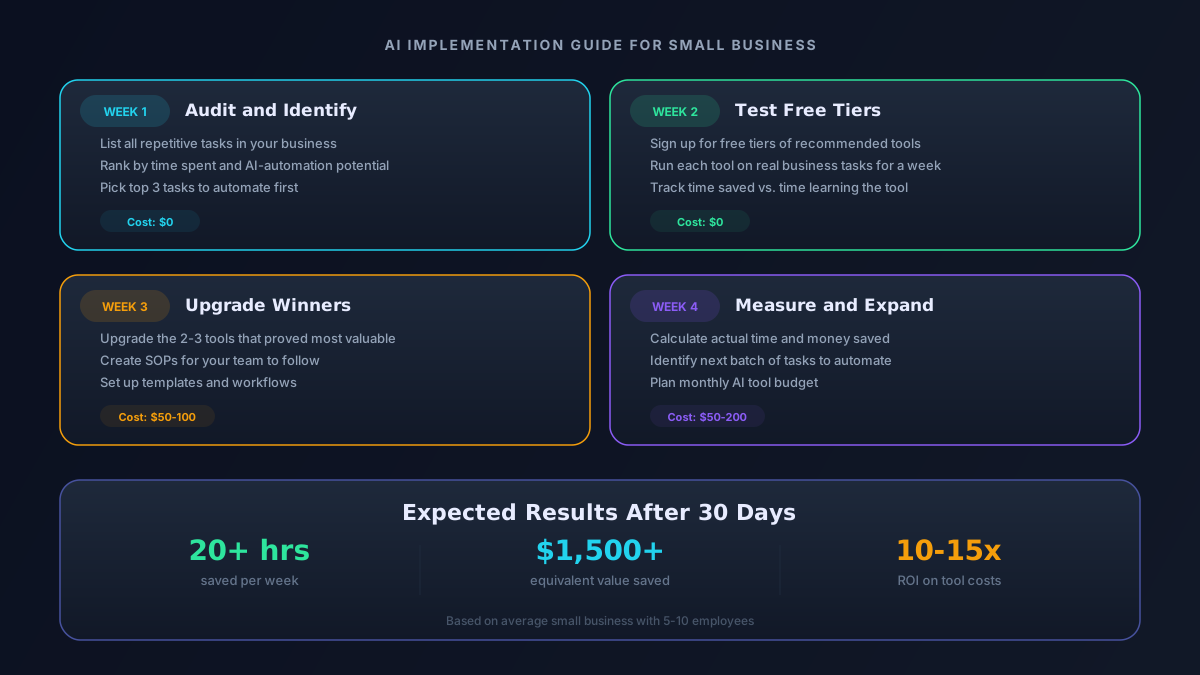
The bottom line: AI tools aren't replacing small business owners. They're giving you superpowers. The businesses that adopt these tools now will have a significant advantage over those that wait.